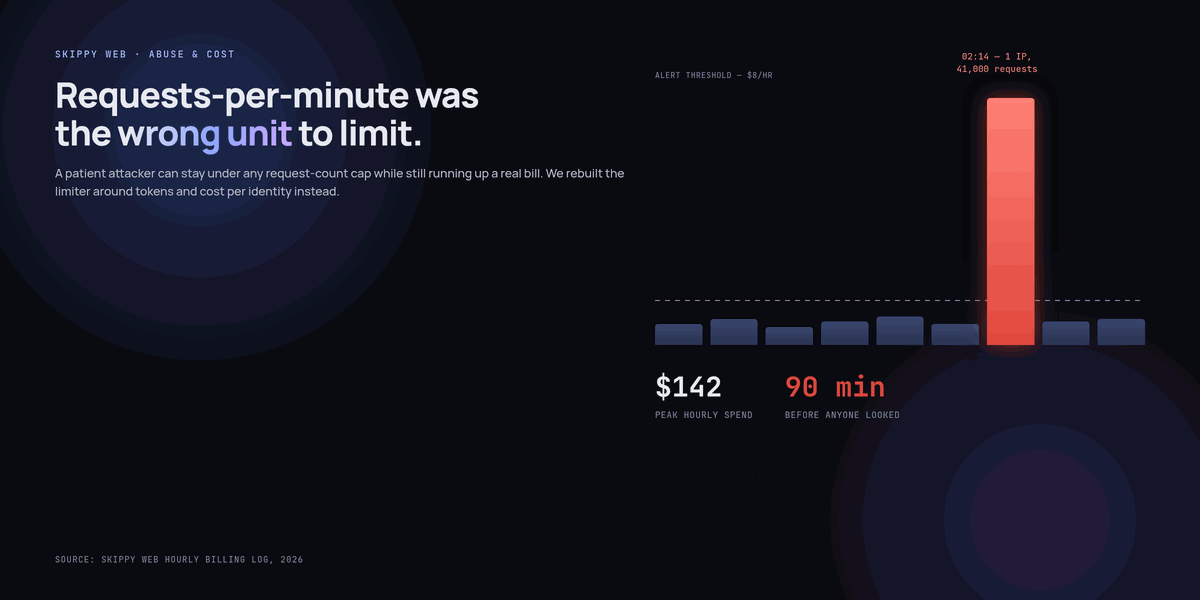
At 2:14am our billing alert fired for the first time in the eight months that feature had been live. By the time someone was awake enough to look, a single IP address had sent 41,000 requests to our document Q&A endpoint in ninety minutes. Nothing was broken. Nothing had crashed. It was just quietly, efficiently spending our money, and it would have kept doing that indefinitely if the alert threshold had been set ten dollars higher.
We had rate limiting. We’d had it since launch. It just limited the wrong thing — requests per minute, which a patient attacker with no urgency can simply stay under forever while still running up an enormous bill, because a request per minute limit says nothing about how expensive each of those requests is.
Requests-per-minute is the wrong unit for a feature billed by the token
Every other endpoint on our site costs roughly the same to serve regardless of what’s requested — a product page is a product page. An AI feature doesn’t work like that. A one-line question and a request asking the model to summarise a 40-page document arrive as the same single “request” to a naive rate limiter, but one costs fractions of a cent and the other costs real money, and an attacker who understands your billing model will always choose the second kind.
Our limiter was capping requests per minute per IP, which is exactly the wrong axis. The attacker wasn’t sending an unusual number of requests — 41,000 over ninety minutes is well within what a generous per-minute cap would allow. Each request was just deliberately expensive: maximum-length inputs, asked in a way that produced maximum-length outputs, run in a loop from a rotating set of IPs that each individually stayed under any request-count threshold we’d have reasonably set.
What we should have been limiting from day one: tokens, and cost, per identity
The fix wasn’t a stricter version of the same limiter. It was limiting a different thing entirely — token spend per authenticated user, with IP-based limits as a much cruder secondary net for anonymous traffic, since IPs are trivial to rotate and identity isn’t.
// Token bucket per user, refilled continuously, drained by actual
// tokens consumed — not by request count
const BUCKET_CAPACITY = 50_000;   // tokens
const REFILL_RATE = 50_000 / 3600; // tokens per second, i.e. full refill per hour

async function checkAndConsume(userId, estimatedTokens) {
  const bucket = await redis.hgetall(`tokenbucket:${userId}`);
  const now = Date.now();
  const elapsed = (now - (bucket.lastRefill || now)) / 1000;

  const current = Math.min(
    BUCKET_CAPACITY,
    (Number(bucket.tokens) || BUCKET_CAPACITY) + elapsed * REFILL_RATE
  );

  if (current < estimatedTokens) {
    return { allowed: false, retryAfterSeconds: (estimatedTokens - current) / REFILL_RATE };
  }

  await redis.hset(`tokenbucket:${userId}`, {
    tokens: current - estimatedTokens,
    lastRefill: now,
  });
  return { allowed: true };
}
The critical detail is estimating tokens before the model call, from input length and a conservative guess at output length, not after — checking the bucket after you've already paid for the generation defeats the entire purpose of a limiter. We estimate input tokens exactly (it's deterministic) and cap the requested output length itself as part of the same check, so the estimate is always an upper bound rather than a guess that can be blown past.
Anonymous traffic needs a harder, uglier limit
Authenticated users get the generous token bucket above. Anonymous traffic — the case that actually bit us, since the attacker never logged in — gets something much stricter and much cheaper to enforce: a hard cap on both input length and output length before the request is even queued, plus a much smaller token budget keyed to a fingerprint that's harder to rotate than a bare IP.
- Input truncated at 2,000 characters for anonymous requests, regardless of what the UI form technically allows — logged-in users get more.
- Output capped at 400 tokens via the provider's own max-tokens parameter, not just requested politely in the prompt. A limit the model can choose to ignore isn't a limit.
- Fingerprint, not bare IP — a coarse hash of IP plus user-agent plus a few TLS-level signals, specifically because the attack that found us was already rotating IPs from a small pool.
- A CAPTCHA challenge, not a hard block, once a fingerprint crosses a suspicion threshold — outright blocking teaches an attacker exactly where the line is and invites them to stay just under it forever; friction is more effective than a wall you can precisely map.
None of this is exotic. It's the same defense-in-depth thinking any API under abuse needs — the specific mistake was assuming that because the feature was "AI," normal API rate-limiting wisdom didn't apply, when in fact it applied more, because the cost variance per request is so much higher than anything we'd built rate limits for before.
A request-count limit answers "how often." A cost problem needs an answer to "how much" — and for a token-billed feature, those are never the same question.
The alert that should have fired hours earlier
The billing alert existed, but it was a daily-total threshold, which is exactly the wrong granularity for catching something that ramps from normal to alarming in ninety minutes — by the time a daily total looks wrong, a fast attack has already run its course and the money is already spent. We replaced it with an hourly-cost alert with a much tighter threshold, specifically because a sudden hourly spike is detectable in real time in a way a daily total structurally cannot be.
// Checked every 5 minutes against a rolling hourly window
const HOURLY_COST_ALERT_THRESHOLD_USD = 8; // ~4x our highest normal hour

async function checkHourlySpend() {
  const spend = await getRollingHourlySpend(); // sum of actual provider billing events
  if (spend > HOURLY_COST_ALERT_THRESHOLD_USD) {
    await pageOncall({
      message: `AI spend $${spend.toFixed(2)} in trailing hour, ` +
               `threshold is $${HOURLY_COST_ALERT_THRESHOLD_USD}`,
    });
  }
}
Four times normal peak sounds generous, and it is deliberately generous — a real traffic spike from a product launch or a press mention should never page anyone at 2am. The point isn't to catch every anomaly instantly, it's to catch the specific shape of an automated attack, which looks nothing like organic traffic growth even at a loose threshold.
What changed after, beyond the limiter itself
We now treat "what does abuse of this feature cost per hour if nothing stops it" as a required question before launch, alongside the usual latency and correctness questions — for every AI feature, not just the ones that seem obviously exploitable. The document Q&A tool didn't seem like an abuse target until someone found it wasn't rate-limited on the axis that mattered. We assume the same is true of anything we haven't specifically load-tested for cost abuse.
We also stopped assuming an attacker's goal is always to break something. This one wasn't trying to take the site down or extract data — it was, as far as we can tell from the pattern, simply running arbitrage: probing a public endpoint that does something expensive for free, presumably to resell access to it or to run their own workload through our bill. That's a different threat model than the one most security thinking defaults to, and it needs a different defense: not "keep them out," but "make it not worth their time."
Key takeaways
- Requests-per-minute is the wrong unit for anything billed by the token — a patient attacker can stay under any reasonable request-count cap while still running up a large bill through expensive individual requests.
- Rate limit on tokens and cost per identity, estimated before the model call, not after — checking your budget after you've already paid for the generation defeats the purpose.
- Anonymous traffic needs stricter, cheaper-to-enforce limits than authenticated traffic: hard input/output caps, a harder-to-rotate fingerprint than bare IP, and friction (like a CAPTCHA) rather than an outright block once suspicion crosses a threshold.
- Daily-total billing alerts are too coarse to catch a fast attack — an hourly rolling-spend alert catches the same event while it's still happening instead of after the money's gone.
- Set the hourly alert threshold well above normal peak (we used roughly 4x) so it triggers on attack-shaped spikes, not on legitimate traffic growth or a good marketing day.
- Ask "what does unmitigated abuse of this feature cost per hour" before launch, for every AI feature — not just the ones that look like obvious targets.
- Not every attacker wants to break your site. Some just want cheap access to an expensive capability at your expense, which calls for friction and cost caps rather than a wall to keep intruders out.
Frequently asked questions
Isn't request-count rate limiting still worth having?
Yes, as a secondary layer against a different failure mode — a script hammering your endpoint with rapid identical requests. It just isn't sufficient on its own for anything billed by consumption, because it says nothing about how expensive each request is. Run both: a request-count limit and a token/cost budget, checking different things.
How do you estimate output tokens before the model has generated anything?
You don't estimate precisely — you cap it. Set a hard max_tokens parameter on the provider call itself so the worst case is bounded and known in advance, then charge the limiter for that worst case rather than trying to predict the actual output length, which you can't know until generation is already happening.
Won't legitimate power users hit these limits too?
Some will, which is exactly why the authenticated-user bucket should be generous enough to cover realistic heavy use — ours refills a full budget hourly, which no legitimate single user has come close to hitting since launch. Size the limit from your actual usage distribution, not from a guess, and expect to tune it after real traffic shows you the shape of normal use.
What's a reasonable hourly-spend alert threshold to start with?
Look at your highest normal hour over the past month and set the alert at three to five times that. Too tight and normal traffic spikes page someone unnecessarily; too loose and you're back to a daily-total alert that catches the damage after it's done. Tune it down over time as you build confidence in what normal actually looks like.
Do fingerprinting techniques like this cause privacy concerns?
Keep the fingerprint coarse and purpose-limited — ours is a hash used only for abuse-rate decisions, stored briefly, and never joined with other user data or used for tracking. Document exactly what it's for and how long it's retained, and treat it as a security control with its own minimal footprint, not as a general analytics signal.