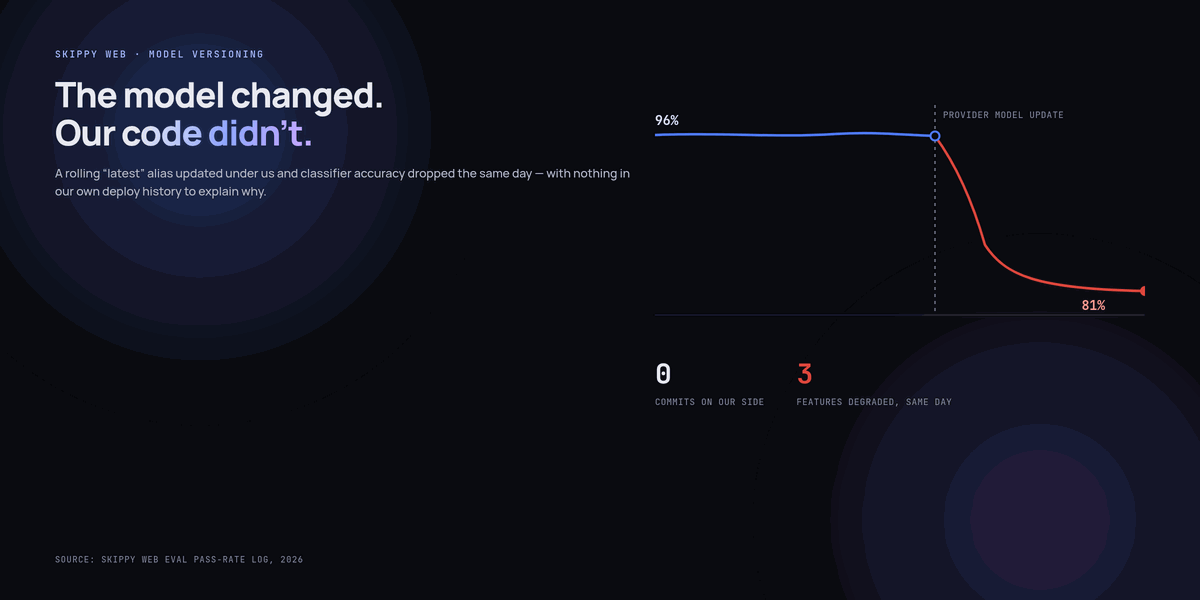
Three features that had been stable for months all got measurably worse on the same Tuesday, and we spent the first two hours of the incident looking in completely the wrong place, because we’d deployed nothing. Git blame had nothing to say. The prompts hadn’t changed, the code hadn’t changed, the infrastructure hadn’t changed. The model had.
We were calling a model alias that auto-updates to the provider’s latest version rather than a pinned snapshot, because pinning had felt like unnecessary caution when we set it up — why would we want to stay on an older model once a better one shipped? The answer arrived the day a routine version update changed behaviour in ways our prompts weren’t written for, and nothing in our own deploy history showed it, because from our side, nothing had deployed at all.
Why “auto-update to latest” sounds right and usually isn’t
The instinct is reasonable on its face: a newer model is generally more capable, so why deliberately stay behind? The problem is that “more capable overall” and “behaves identically for your specific prompt” are unrelated claims. A prompt is tuned, whether deliberately or by trial and error, against the quirks of the exact model version that was running when it was written — its particular tendency to follow instructions in a certain order, to interpret an ambiguous phrase a certain way, to default to a certain output format when the schema isn’t perfectly explicit. A version update can improve the model in general while breaking the specific thing your prompt was quietly relying on.
In our case, the update changed how the model handled a slightly underspecified instruction in our classifier prompt — it had previously defaulted to our most common category when genuinely unsure, which matched our data distribution well by accident, and the new version defaulted to a different, more “cautious” category instead. Nothing about that change is a bug in the model. It’s just a different reasonable choice, made by a provider who has no visibility into the fact that our specific prompt was silently depending on the old one.
Pin the version, then decide deliberately when to move
The fix was mechanically simple and should have been the default from day one: call a specific, dated model snapshot rather than a rolling alias, everywhere.
// Before — silently moves under you whenever the provider updates the alias
const MODEL = 'provider-model-latest';

// After — moves only when we deliberately change this line
const MODEL = 'provider-model-2026-06-15';
Pinning trades one risk for a different, much more manageable one. You no longer get silently moved, but you also don’t get security patches or improvements automatically, and providers eventually retire old snapshots on their own schedule — most major providers commit to a minimum notice period before that happens (Anthropic’s stated policy, for example, is at least 60 days for publicly released models), which is enough time to test a migration deliberately if you’re watching for the notice, and not nearly enough time if you find out from a support email you didn’t read.
Migrating to a new version is now a change we test, not a change that arrives
The eval harness we’d already built for catching prompt regressions turned out to be exactly the right tool for catching model-version regressions too — a version migration is just a different kind of change to the same system, and it deserves the same gate.
# Run the full eval suite against both versions before switching
node scripts/run-evals.js --model=provider-model-2026-06-15 --suite=all --out=old.json
node scripts/run-evals.js --model=provider-model-2026-09-01 --suite=all --out=new.json
node scripts/diff-eval-results.js old.json new.json

# Output flags any case that passed on the old version and fails on the new one —
# these are the specific regressions a migration would otherwise ship blind
This surfaced exactly the kind of thing that bit us the first time: a handful of cases in the classifier’s eval set flip from pass to fail on the newer version, concentrated in the ambiguous-category cases, which is precisely where the underlying behaviour had changed. Seeing that before switching, instead of after, turns a multi-hour incident into an adjustment to the prompt made calmly, on our own schedule, with the actual failure cases in front of us.
A pinned version doesn’t mean never upgrading. It means upgrading is a change you make and can test, instead of a change that happens to you and that you have to diagnose after the fact.
Monitoring for drift you didn’t cause
Pinning stops silent alias-based drift, but it doesn’t stop every form of it — providers occasionally adjust behaviour within a snapshot for safety or infrastructure reasons without a version bump, rarer than a full version change but not impossible. The weekly scheduled eval run we built for catching prompt drift (covered in a separate piece on our eval harness) runs against the live pinned model regardless of whether we’ve touched anything, specifically to catch this rarer case — it’s the same mechanism, applied on a schedule instead of only on our own commits.
We also now track the model version string itself as a labeled dimension in our metrics, alongside latency and error rate, so a step-change in output quality can be correlated against a version change even when that change came from our own deliberate migration rather than something silent. It sounds obvious in hindsight. It wasn’t in our dashboards until after this incident.
What we tell every new feature owner now
- Never call a rolling “latest” alias in anything customer-facing. Pin a specific snapshot, full stop — the convenience isn’t worth the blast radius when it moves under you at a time you don’t choose.
- Subscribe to the provider’s deprecation and update notifications for every model you use, and route them somewhere a human actually reads, not a shared inbox that gets skimmed once a quarter.
- Run the eval suite against the new version before switching, and treat any regression the diff surfaces as a blocker, the same way you’d treat a failing test in ordinary code.
- Budget calendar time for migrations rather than treating a deprecation notice as background noise — a 60-day notice is generous only if you start using it on day one.
The uncomfortable trade-off underneath all of this
Pinning is a small, ongoing tax: someone has to actually do the migration work periodically instead of getting it for free, and “for free” is genuinely tempting when there are a dozen other things competing for that time. We’ve made peace with paying it, because the alternative isn’t “no cost” — it’s the same cost, deferred to a moment you don’t choose, arriving as an incident instead of a scheduled task. We’d rather decide when we pay it.
Key takeaways
- A rolling “latest” model alias can change your feature’s behaviour with zero commits on your side, which makes the resulting incident far harder to diagnose than an ordinary regression.
- A model update that makes the model generally better can still break a specific prompt that was implicitly relying on the old version’s particular quirks.
- Pin a specific, dated model snapshot everywhere in production, and treat a version change as a deliberate, tested migration rather than something that happens automatically.
- Reuse your existing eval harness to diff pass/fail results between the old and new version before switching — this surfaces the exact regressions a blind migration would otherwise ship.
- Major providers give advance notice before retiring a snapshot (Anthropic’s policy is a minimum of 60 days for publicly released models) — route those notifications somewhere they’ll actually be read, and budget real time for the migration rather than treating the notice period as slack.
- Track model version as a labeled dimension in your own metrics so a quality shift can be correlated against a version change, whether that change was yours or the provider’s.
- Pinning has an ongoing cost — someone has to do migrations deliberately. That cost doesn’t disappear if you skip it; it just arrives later, as an incident instead of a scheduled task.
Frequently asked questions
Doesn’t pinning mean missing out on model improvements?
Only until you deliberately migrate, which you should still do regularly — just on a schedule you control, tested against your eval suite first. Pinning trades automatic improvement for predictability; you get the improvement anyway, on your own timeline, instead of being surprised by it.
How often should we actually migrate to a newer pinned version?
We review new snapshots roughly quarterly, or immediately when a deprecation notice forces the question, whichever comes first. There’s no universal cadence — weigh it against how much migration testing costs for your specific set of features against how much you’re leaving on the table by staying behind.
What if two features need different model versions at the same time, mid-migration?
That’s normal and fine — pin per feature, not globally, so a classifier that needs more migration testing can stay on the older snapshot while a lower-risk feature moves first. A single shared model constant for your whole codebase is convenient right up until you need this flexibility.
Can eval-suite diffing catch every kind of regression from a version change?
No — it catches regressions on the axes your eval set already covers, which is exactly the same limitation the eval harness has for prompt changes. A completely new failure mode the new version introduces, on an input your dataset doesn’t represent, won’t show up in the diff. It’s a strong first filter, not a guarantee.
Is it worth building this for a side project or small feature, not just production-critical ones?
Pinning the version costs nothing extra to set up — do it everywhere, always, regardless of scale. The full eval-diff migration process is worth reserving for anything where a silent regression would actually matter; for a low-stakes feature, reading the provider’s changelog before migrating manually is a reasonable, cheaper substitute.