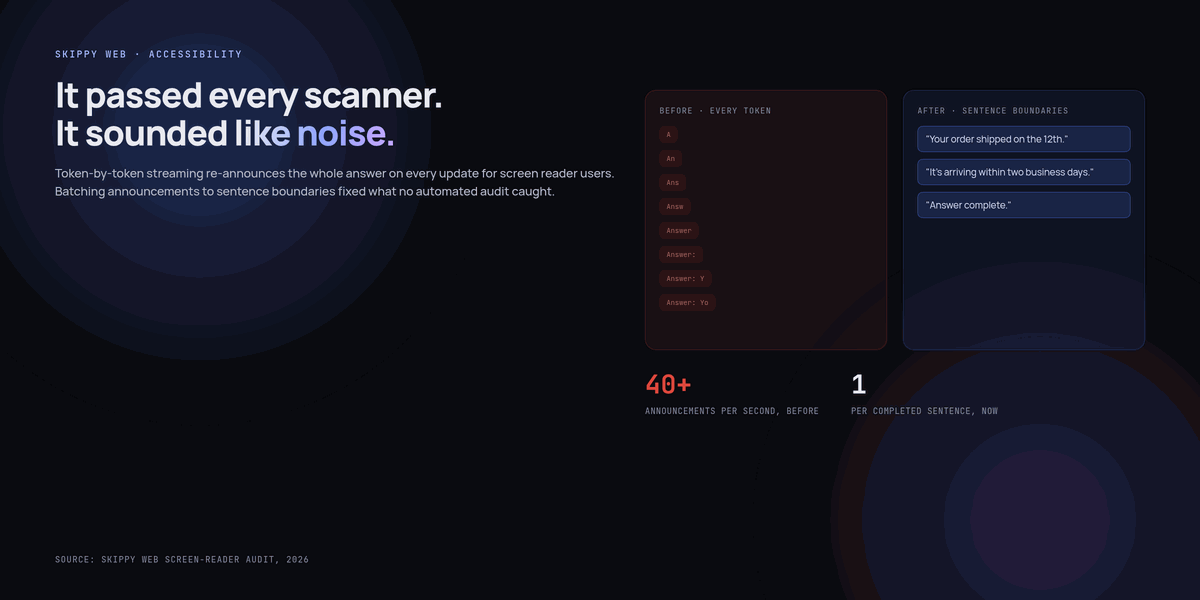
A support ticket from a screen reader user described our new AI answer feature as “unusable, it just makes noise.” Every automated accessibility scan we’d run against the page came back clean. It took an actual screen reader session, listening to what the feature sounded like rather than reading its markup, to understand the complaint: the moment an answer started streaming in, the screen reader began re-announcing the entire growing block of text on every single token, dozens of times a second, which sounds exactly as unusable as it sounds.
Streaming text is a genuine improvement for sighted users — seeing an answer appear progressively feels faster and more responsive than staring at a spinner. Nothing about that improvement was designed with a screen reader in mind, and the failure mode it creates doesn’t show up in any linter, any automated audit, or any test that doesn’t involve actually listening to the page. This is what was actually happening, what we changed, and why we now treat “does it sound right” as its own required check, separate from “does it pass the accessibility scanner.”
Why streaming breaks a screen reader and not a sighted user
Assistive technology announces content changes inside an ARIA live region every time that region’s content mutates, by design — that’s the entire mechanism that lets a screen reader user know something changed without them having to go looking for it. A naive streaming implementation updates the DOM on every token, because that’s the simplest way to render incoming text progressively.
<!-- The naive version — technically has a live region, technically announces
     updates, and is exactly the setup that generated the complaint -->
<div aria-live="polite" id="answer"></div>

<script>
  // Every token append is a DOM mutation, and every mutation queues
  // another announcement on top of whatever's still being read
  for await (const token of stream) {
    answerEl.textContent += token;
  }
</script>
Every automated accessibility checker we ran was satisfied — there’s a live region, it has a valid aria-live value, content inside it does get announced. None of that captures that the announcement is happening dozens of times a second on partial, constantly-invalidated content, which is a behavioral problem no static markup check is built to catch.
The fix: decide what “settled” means, and announce that
The actual fix wasn’t a single ARIA attribute — it was recognizing that a screen reader user doesn’t need to hear every intermediate token any more than they’d want a page read to them letter by letter as it’s typed. They need to know something is happening, and then to hear the finished thought once it’s actually finished.
<div id="answer" aria-busy="true"></div>
<div aria-live="polite" id="answer-announcer" class="sr-only"></div>

<script>
  let buffer = '';
  let lastAnnounced = '';

  for await (const token of stream) {
    buffer += token;
    answerEl.textContent = buffer;          // visual streaming, unchanged, sighted users still see it live

    // Only announce at a sentence boundary, and only the new sentence —
    // not the whole growing buffer, and not every token along the way
    const sentences = buffer.match(/[^.!?]+[.!?]+/g) || [];
    const newComplete = sentences.slice(lastAnnounced ? 1 : 0).join(' ').trim();
    if (sentenceJustCompleted(buffer, lastAnnounced)) {
      announcerEl.textContent = newComplete;
      lastAnnounced = buffer;
    }
  }

  answerEl.removeAttribute('aria-busy');
  announcerEl.textContent = 'Answer complete.';
</script>
The visible text still streams token by token for sighted users — nothing about that experience changed. The separate, visually hidden announcer region only updates at sentence boundaries, so a screen reader hears complete thoughts arrive one at a time rather than a firehose of partial fragments interrupting themselves. aria-busy on the visible container signals that content is still in flight, and a final “Answer complete” announcement gives a clear end marker that the streaming version never had.
A live region that technically validates is not the same claim as a live region that’s pleasant, or even tolerable, to actually listen to. The gap between those two only shows up when you listen.
Automated tools couldn’t have caught this, and that’s worth internalising
We ran axe, Lighthouse, and WAVE against both the broken and fixed versions of this feature. All three passed both versions, because all three check for the presence and validity of accessibility markup, not the experiential quality of what that markup produces over time. This isn’t a knock on those tools — they catch a huge and genuinely important class of bugs efficiently — it’s a reminder that a subset of accessibility problems are behavioral and temporal, not structural, and nothing short of turning on a screen reader and listening will surface them. We now include an actual screen-reader pass as a required step before shipping any feature involving streaming, animation, or frequent live-region updates, specifically because this category doesn’t show up any other way.
The pattern generalises past this one feature
Once we knew to look for it, the same shape of problem showed up in two other places: a “typing indicator” animation that re-announced its own presence on every render tick, and a live-updating notification badge that announced its count on every increment during a burst of rapid updates rather than settling once. The common thread across all three is the same: something built to be continuously, visually dynamic needs a deliberate, separate answer for what a non-visual user should be told, and how often — that answer is essentially never “tell them everything, the moment it happens,” because that’s not how anyone, sighted or not, actually wants to receive a stream of rapidly changing information.
Adding this to a pre-ship checklist, not just a memory
The failure mode is easy to reintroduce even after you’ve fixed it once, because the naive version is also the simplest version to write — a new engineer building the next streaming feature will reach for textContent += inside a live region unless something stops them. We added a specific line item to our accessibility checklist for any feature involving streaming, animation, or rapid state changes: “listen to this with a screen reader before merging,” not just “run the automated scanner.” It’s a small addition, but it’s the only line on that checklist that exists because a tool couldn’t have caught the thing it’s guarding against — everything else on the list is there because a scanner flags it reliably, which made this one easy to leave off by default until the support ticket forced the question.
Key takeaways
- An ARIA live region announces on every DOM mutation inside it — a naive token-by-token streaming update triggers dozens of announcements a second, which is technically valid markup and a genuinely unusable experience.
- Automated accessibility scanners (axe, Lighthouse, WAVE) check for correct, present markup, not for how an experience actually sounds over time — this class of bug passes all of them.
- Separate the visible streaming update (unchanged, still token by token for sighted users) from a distinct, visually hidden live region that only announces at natural boundaries like completed sentences.
- Use
aria-busyto signal in-progress state and an explicit completion announcement, giving screen reader users a clear start and end the raw streaming version never provided. - Include an actual screen-reader listening pass as a required pre-ship step for any feature with streaming, animation, or frequent live updates — this category of bug does not show up in automated scans.
- The same pattern (decide what “settled” means, announce that, not every intermediate state) applies to any continuously-updating UI, not just streaming text — typing indicators and live counters have the identical failure mode.
Frequently asked questions
Why not just use aria-live=”assertive” or a single announcement at the very end?
Assertive interrupts whatever the screen reader is already reading, which is worse, not better, for a long streaming answer. Announcing only once at the very end works but leaves a screen reader user with no sense that anything is happening during a long generation — the sentence-boundary approach is the middle ground that gives progressive feedback without the firehose problem.
Does this approach work the same way for very short answers that finish in one sentence?
Yes — a short answer just means the sentence-boundary announcement and the completion announcement land close together, which is fine. The mechanism doesn’t need special-casing for short responses; it degrades gracefully on its own.
How did you catch the two other instances of this pattern (typing indicator, notification badge)?
Deliberately, once we knew the shape of the bug — we did a targeted screen-reader pass over every feature with any kind of live or animated update, specifically looking for this failure mode, rather than waiting for another support ticket to find the next one.
Is sentence-boundary detection reliable enough for this, given streamed text can have odd punctuation?
It’s good enough in practice, not perfect — an abbreviation or a decimal number can occasionally trigger a false boundary. A slightly early or late announcement boundary is a minor imperfection; it’s a completely different category of problem from the original firehose behavior, so we didn’t hold out for a perfect sentence detector before shipping the fix.
Should sighted users get any change here too, or is this purely a screen-reader fix?
We didn’t change anything about the visible experience — sighted users still see token-by-token streaming exactly as before. This was specifically a non-visual experience gap; fixing it required adding a parallel path, not modifying the one that was already working for most users.