Most websites bolt a chatbot into the corner and call it an AI strategy. The features that actually change how people use a site are quieter, cheaper, and far more useful — and semantic search is where almost everyone should start.
There’s a version of “AI on your website” that has become depressingly standard: a purple gradient bubble in the bottom-right corner that opens a chat window nobody asked for, answers questions badly, and gets dismissed within two seconds. It ships because it’s visible, it demos well to stakeholders, and it requires no understanding of what users actually struggle with on the site.
Meanwhile the genuinely valuable applications sit unbuilt, because they don’t look like AI. They look like the site working better.
This is a practical tour of the AI features that are worth building into a web product in 2026 — what they do, roughly what they cost, and enough code to show the shape of the thing.
Start here: search that understands meaning
Site search is the most under-invested feature on the entire web. Most sites run keyword matching — the database looks for rows containing the literal words the user typed. Someone searching for “how do I get my money back” finds nothing, because your policy page says “refunds and returns.”
Semantic search fixes exactly this. Instead of matching words, you convert both your content and the user’s query into embeddings — lists of numbers that represent meaning — and find the content whose numbers sit closest to the query’s numbers. “Get my money back” and “refund policy” land near each other in that space, because they mean the same thing.
This is not exotic infrastructure anymore. If you’re on Postgres, you already have most of it.
The schema
CREATE EXTENSION IF NOT EXISTS vector;

CREATE TABLE content_chunks (
  id          bigserial PRIMARY KEY,
  page_id     bigint NOT NULL REFERENCES pages(id) ON DELETE CASCADE,
  heading     text,
  body        text NOT NULL,
  url         text NOT NULL,
  embedding   vector(1536),
  updated_at  timestamptz NOT NULL DEFAULT now()
);

-- Approximate nearest-neighbour index for cosine distance
CREATE INDEX ON content_chunks
  USING hnsw (embedding vector_cosine_ops);
Indexing your content
Split each page into chunks of roughly 300–800 tokens, ideally along heading boundaries so each chunk is about one thing. Embed each chunk and store the vector.
import { embedMany } from 'ai';
import { openai } from '@ai-sdk/openai';

const chunks = splitByHeadings(page.html); // your own splitter

const { embeddings } = await embedMany({
  model: openai.embedding('text-embedding-3-small'),
  values: chunks.map(c => `${c.heading}\n\n${c.body}`),
});

await db.insert(contentChunks).values(
  chunks.map((c, i) => ({
    pageId: page.id,
    heading: c.heading,
    body: c.body,
    url: `${page.url}#${c.anchor}`,
    embedding: embeddings[i],
  }))
);
Querying
-- $1 is the embedded user query
SELECT id, heading, url, body,
       1 - (embedding <=> $1) AS similarity
FROM content_chunks
WHERE 1 - (embedding <=> $1) > 0.35
ORDER BY embedding <=> $1
LIMIT 8;
In practice the strongest results come from hybrid search: run semantic search and traditional full-text search in parallel, then merge the two ranked lists. Semantic search is weak on exact identifiers — product SKUs, error codes, version numbers — and keyword search is exactly what you want for those. Reciprocal rank fusion is a ten-line function and gets you most of the benefit.
The cost is trivial. Embedding a few thousand pages of content costs single-digit dollars and takes minutes. The ongoing cost is one embedding call per search query, at a fraction of a cent.
Answers on top of search (RAG, done responsibly)
Once you have semantic retrieval, generating an answer from the retrieved chunks is a short step. This is retrieval-augmented generation, and the important word is retrieval — the model isn’t answering from its own knowledge, it’s summarising documents you handed it.
// app/api/answer/route.ts
import { streamText } from 'ai';
import { openai } from '@ai-sdk/openai';

export async function POST(req: Request) {
  const { question } = await req.json();
  const chunks = await semanticSearch(question, { limit: 6 });

  if (chunks.length === 0) {
    return Response.json({ answer: null, reason: 'no_match' });
  }

  const context = chunks
    .map((c, i) => `[${i + 1}] ${c.heading}\nURL: ${c.url}\n${c.body}`)
    .join('\n\n---\n\n');

  const result = streamText({
    model: openai('gpt-4.1-mini'),
    system:
      'Answer only from the numbered sources below. ' +
      'Cite sources inline as [1], [2]. ' +
      'If the sources do not contain the answer, say so plainly ' +
      'and do not guess.',
    prompt: `Sources:\n\n${context}\n\nQuestion: ${question}`,
  });

  return result.toTextStreamResponse();
}
Three rules separate a RAG feature that builds trust from one that destroys it:
- Always cite, always link. Every claim gets a source the user can click. This turns the AI from an oracle into a very good index, which is both more honest and more useful.
- Allow “I don’t know.” A system that always produces an answer will produce a wrong one. Set a similarity floor and return nothing when the retrieved chunks are weak.
- Never let it answer about policy, pricing, or legal terms without showing the source document. These are the questions where a confident wrong answer costs you real money.
Streaming is not optional
Generating a paragraph takes a few seconds. Three seconds of a blank screen feels broken; three seconds of text appearing word by word feels fast. Stream everything.
const res = await fetch('/api/answer', {
  method: 'POST',
  body: JSON.stringify({ question }),
});

const reader = res.body!.pipeThrough(new TextDecoderStream()).getReader();

for (;;) {
  const { value, done } = await reader.read();
  if (done) break;
  setAnswer(prev => prev + value);
}
Render a skeleton immediately on submit, stream into it, and reveal the citation list once the stream closes. The perceived performance difference is enormous for about twenty lines of code.
The unglamorous wins
These get no attention and deliver disproportionate value.
Alt text at scale
Most sites have thousands of images with empty or useless alt attributes. Vision models generate genuinely decent descriptions. Run it over your media library, queue the results for human approval rather than publishing blind, and you’ve fixed an accessibility problem that has sat in the backlog for five years. This is a weekend’s work with a real, measurable outcome.
Content operations
Meta descriptions, internal linking suggestions, tag and category assignment, detecting near-duplicate pages, flagging content that contradicts your updated documentation. All of this is classification and summarisation over text you already own — the tasks models are most reliable at.
Support triage
Not answering support tickets — routing them. Classify incoming messages by topic, urgency, and sentiment; attach the three most relevant help articles; surface the customer’s recent order history. The human agent still writes the reply, but starts thirty seconds in rather than three minutes in. Accuracy requirements are much lower than for customer-facing answers, because a human reviews every case.
Structured extraction from unstructured input
Pulling line items from an uploaded invoice, parsing a CV into fields, converting a pasted address block into a structured record. Constrain the output with a schema and you get reliable structure out of messy input:
import { generateObject } from 'ai';
import { z } from 'zod';

const { object } = await generateObject({
  model: openai('gpt-4.1-mini'),
  schema: z.object({
    supplier: z.string(),
    invoiceNumber: z.string(),
    currency: z.enum(['EUR', 'USD', 'GBP']),
    lineItems: z.array(z.object({
      description: z.string(),
      quantity: z.number(),
      unitPrice: z.number(),
    })),
    total: z.number(),
  }),
  prompt: rawInvoiceText,
});
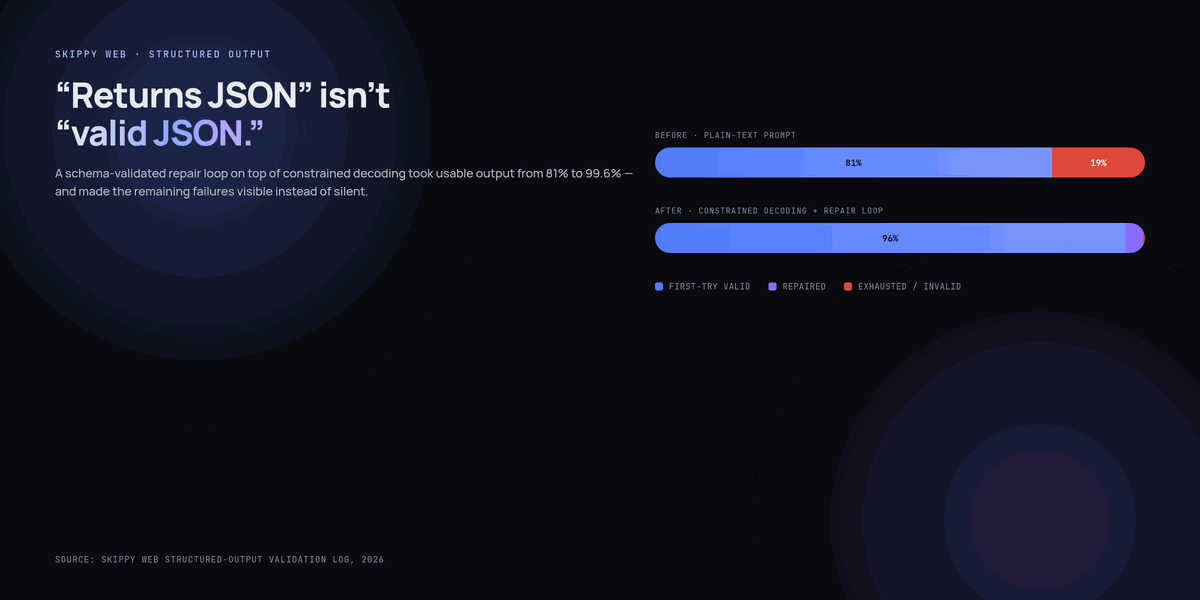
Schema-constrained output is the most underrated feature in the whole toolkit. It turns “the model might return anything” into “the model returns this shape or the call fails,” which is the difference between a demo and a production feature.
The engineering realities nobody demos
Adding AI to a website introduces a class of problem that normal features don’t have. Plan for these from the start.
- Latency is user-visible and variable. Model calls take seconds, not milliseconds, and occasionally take much longer. Stream, show progress, and set hard timeouts with a graceful fallback to plain search results.
- Cost scales with usage, unlike a database query. Set per-user and per-day spend limits before launch, not after the first surprise invoice. Cache aggressively — a large share of queries on any site are repeats.
- Prompt injection is real. If your model reads user-generated content, someone will eventually embed “ignore previous instructions” in a product review. Never give a model that reads untrusted text the ability to take destructive actions. Separate retrieval from anything that writes.
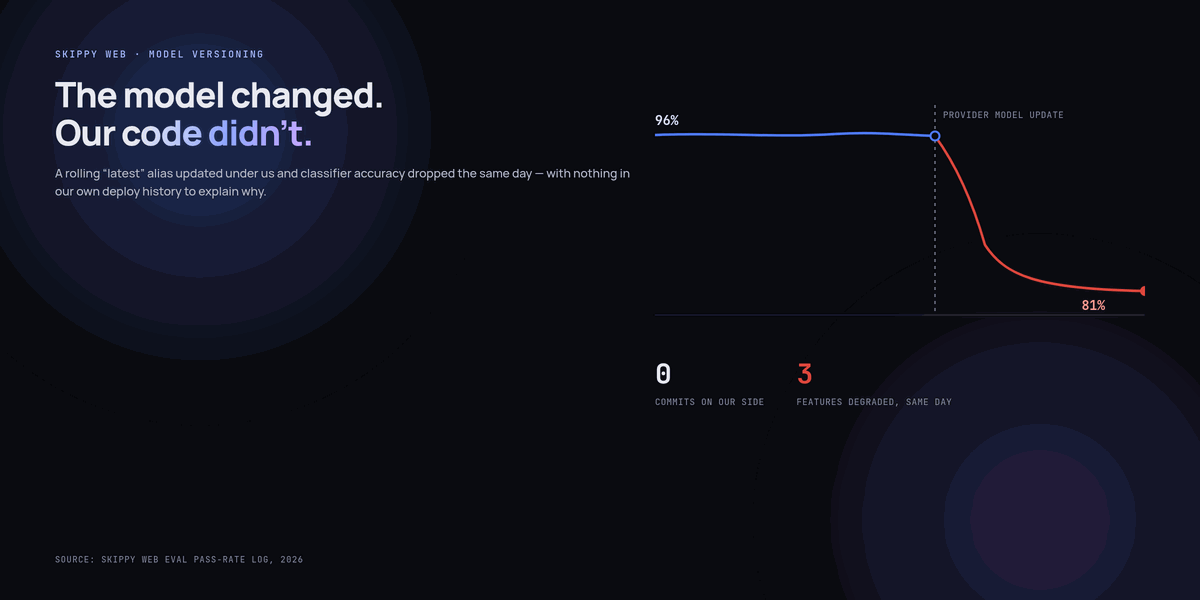
- Providers change underneath you. Models get deprecated, prices change, behaviour shifts between versions. Put every model call behind one internal module so swapping providers is a one-file change.
- You need evaluation, not vibes. Keep a fixed set of fifty real user questions with known-good answers. Run it before every prompt or model change. Without this you’re guessing, and prompt changes that feel like improvements frequently aren’t.
- Everything degrades to a non-AI path. If the provider is down, semantic search falls back to keyword search and the answer box simply doesn’t render. Users should get a slightly worse site, never a broken one.
A sensible order of work
If you’re starting from nothing, this sequence delivers value fastest and builds the infrastructure the later steps need:
- Semantic search over your existing content. Low cost, low risk, immediately measurable in search success rate and bounce rate from your results page.
- Citation-first answers on top of it. Reuses the same retrieval, adds a generation step, keeps the sources visible.
- Back-office features: alt text, tagging, support triage. High value, low customer-facing risk.
- Structured extraction wherever users are currently typing things into forms that they already have in a document.
- Only then consider conversational interfaces — and only if you’ve identified a real task users struggle to complete, not because the homepage needs a chat bubble.
The honest summary
The best AI features on a website are the ones users never identify as AI. They just notice that search works now, that the help article they needed came up first, that the form pre-filled itself correctly from the PDF they uploaded.
That’s a lower-ego kind of product work than launching a chatbot, and it’s worth considerably more. Build the boring thing first.
Key takeaways
- Semantic search is the highest-value AI feature for most websites and costs very little — if you run Postgres,
pgvectorplus an embedding model is most of the implementation. - Hybrid search (semantic plus keyword) beats either alone, because semantic search is weak on exact identifiers like SKUs and error codes.
- RAG answers must cite sources, link to them, and be allowed to say “I don’t know” when retrieval is weak.
- Stream every generated response. Three seconds of streaming text feels fast; three seconds of blank screen feels broken.
- Schema-constrained output (
generateObjectwith Zod) is what turns unreliable generation into a production-grade feature. - Plan for variable latency, usage-based cost, prompt injection, provider churn, and a non-AI fallback path before launch, not after.
- The unglamorous features — alt text, content ops, support triage, structured extraction — deliver more value per hour than any chatbot.
Frequently asked questions
Do I need a dedicated vector database?
Almost certainly not at first. pgvector on your existing Postgres handles millions of vectors comfortably and saves you an entire piece of infrastructure to operate, back up, and keep in sync. Move to a dedicated vector store when you have a measured performance problem, not before.
How much does semantic search actually cost to run?
Indexing is a one-off cost measured in single-digit dollars for a few thousand pages, plus re-embedding when content changes. Per query you pay for one small embedding call — a fraction of a cent. Generated answers cost meaningfully more than search alone, which is a good reason to make the answer box optional rather than automatic on every query.
How do I stop the AI from making things up about my products?
Retrieve first, and instruct the model to answer only from the retrieved sources. Set a similarity threshold below which you return no answer at all. Show citations inline so users can verify. And keep pricing, legal terms, and policy details out of generated text entirely — link to the canonical page instead.
What is prompt injection and should I worry about it?
It’s when instructions hidden in content the model reads — a product review, an uploaded document, a scraped page — cause it to behave differently than you intended. Worry about it whenever a model that reads untrusted input can also take actions. The mitigation is architectural: keep the reading path and the writing path separate, and never grant destructive permissions to a component that processes user content.
Can I add these features to a WordPress site?
Yes. The pattern is the same: index your posts and pages into a vector store, expose a search endpoint, and render the results. You can do it with a plugin, a custom REST API route in your theme, or by running the retrieval layer as a small separate service that your site calls. The architecture doesn’t change — only where the code lives.