Eighty-four percent of developers now use AI tools. Fewer than a third trust them. That gap isn’t a contradiction — it’s the whole story of how AI actually fits into web development.
There are two ways to talk about AI and web development right now, and both of them are useless. One is the demo-reel version, where somebody types “build me an e-commerce site” and a finished store appears. The other is the backlash version, where AI is a plagiarism machine that produces garbage and nothing else. Neither describes what it’s like to actually ship a website with these tools in your hands every day.
The real picture is more interesting, and more useful. AI has quietly become extremely good at a specific set of tasks that used to eat enormous amounts of developer time — and it remains unreliable at a different set that developers are still, understandably, reluctant to hand over. Knowing which is which is now a core professional skill.
The adoption paradox, in numbers
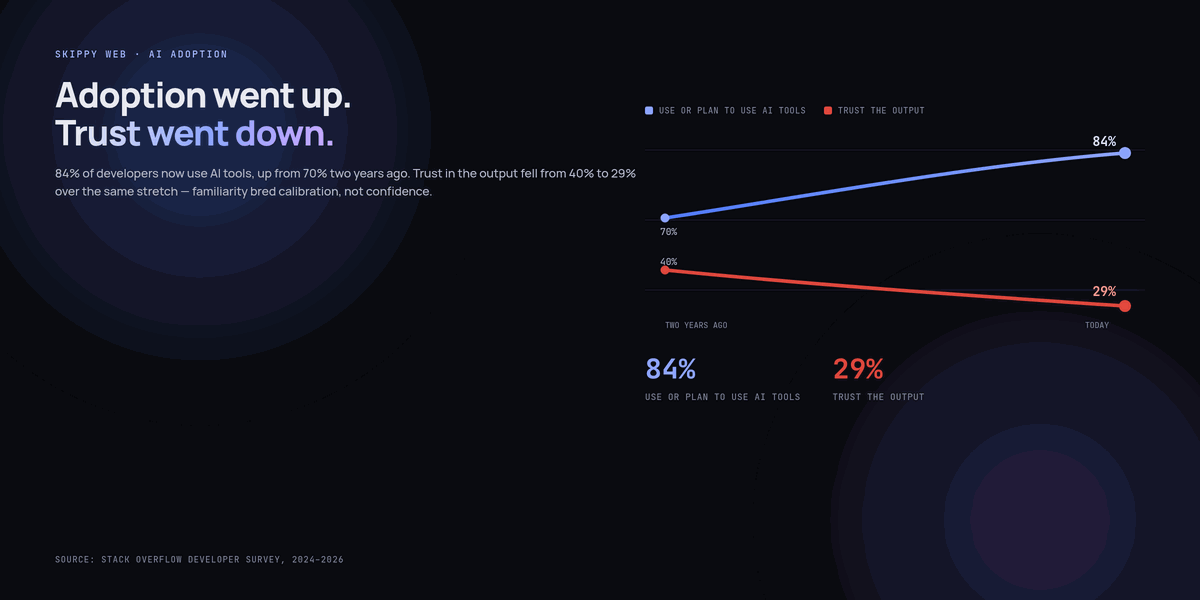
Stack Overflow’s developer survey found more than 84% of respondents using or planning to use AI tools, up from roughly 70% two years earlier. Over the same period, the share of developers who said they trust the output of those tools fell from around 40% to 29%.
That’s backwards from how technology adoption usually works. Normally familiarity breeds confidence. Here, familiarity has bred calibration. Developers kept the tools and lowered their expectations — which is exactly what you’d expect from people who have watched an AI confidently invent an API method that does not exist.
Google’s DORA research points at the same thing from a different angle. Around 90% of technology professionals now use AI at work, and over 80% believe it has made them more productive. But the research also found that higher AI adoption correlates with both increased delivery throughput and increased delivery instability. Teams ship more, and more of what they ship breaks.
DORA’s framing is the single most useful sentence written about this topic: AI is an amplifier. It magnifies the strengths of high-performing organisations and the dysfunctions of struggling ones.
Which means the question “is AI good for web development?” is badly posed. The honest version is: good for whom, doing what, with what safety net underneath?
Where AI genuinely earns its keep
After a couple of years of this being normal rather than novel, a pattern has settled. AI is reliably excellent at tasks that are high-volume, low-ambiguity, and cheap to verify. It gets progressively worse as any of those three conditions weakens.
1. The blank page
Starting is the most expensive part of most tasks, and it’s expensive for reasons that have nothing to do with difficulty. Boilerplate for a new API route, a form component with validation wired up, a Dockerfile, a CI workflow, a Tailwind layout that roughly matches a mockup — all of this is work you’ve done twenty times and will do twenty more. Getting a 70% draft in four seconds and editing it is straightforwardly better than typing it out.
The verification cost here is near zero. You look at it, you know immediately whether it’s right, and you fix it in place.
2. Translation work
Converting a JSON payload into a TypeScript interface. Rewriting a REST handler as a GraphQL resolver. Turning a Figma spec into semantic HTML. Porting a jQuery snippet to vanilla. Converting CSS to Tailwind classes, or back again.
These are mechanical transformations with a correct answer that you can eyeball. They’re also the tasks most likely to make a developer sigh audibly. Handing them over is close to pure gain.
3. Tests — the highest-ROI use there is
This is the one that’s genuinely underrated. Most developers write the happy-path test and then run out of enthusiasm. AI has no enthusiasm to run out of, and it’s remarkably good at enumerating the edge cases you’d rather not think about.
Give it a function and ask specifically for the nasty inputs:
// Prompt: "Write Vitest cases for this function. Focus on
// boundary conditions, empty/null inputs, unicode, and
// anything that could throw. Don't write the happy path."

export function slugify(title: string, maxLength = 60): string {
  return title
    .toLowerCase()
    .normalize('NFKD')
    .replace(/[̀-ͯ]/g, '')
    .replace(/[^a-z0-9]+/g, '-')
    .replace(/^-+|-+$/g, '')
    .slice(0, maxLength)
    .replace(/-+$/, '');
}
What comes back will typically include an empty string, a title made entirely of emoji, a string of 400 characters where the cut lands mid-word, leading and trailing hyphens, and accented characters like “Café” that should become “cafe”. At least one of those will fail. That’s a bug you now know about and would probably have shipped.
Tests are the perfect AI task because the verification is free: you run them. If a generated test passes and the behaviour is wrong, the test told you nothing but cost you nothing. If it fails, you’ve learned something real.
4. Getting oriented in an unfamiliar codebase
Inheriting a client’s five-year-old WordPress theme or a half-documented internal app used to mean a day of reading. Now it means asking questions of the code directly: where does authentication happen, what triggers this cron job, why does this file import three different date libraries.
The answers need checking — always follow the pointer to the actual file — but as a way of building a mental map fast, it’s transformative. Treat it as a very well-read colleague who has skimmed the whole repo and occasionally misremembers.
5. Migrations and codemods
Framework upgrades are where AI shines brightest, because the work is repetitive, the pattern is consistent across hundreds of files, and the compiler or test suite tells you immediately whether you got it wrong.
The trick is not to have the AI edit the files. Have it write the script that edits the files:
# Good: one reviewable artifact, applied deterministically
"Write a jscodeshift codemod that converts every
 `export default connect(mapState)(Component)` in this repo
 to a `useSelector` hook inside the component body.
 Leave files that use mapDispatchToProps untouched and
 log their paths so I can handle them manually."
One script you can read, reason about, and re-run beats 300 individual edits you have to review one at a time.
6. Review, as a second pair of eyes
AI review doesn’t replace human review, but it catches a real and consistent category of things before a human ever sees the diff: unhandled promise rejections, missing await, off-by-one errors, accessibility attributes you forgot, a useEffect missing a dependency, an environment variable referenced but never documented.
These are exactly the comments senior developers get tired of writing for the fifth time. Automating them frees human review for the things only humans can assess: is this the right approach, does this fit the architecture, will the next person understand it.
How to prompt like a spec, not a wish
The single largest difference between developers who get good results and developers who get frustrated isn’t the tool. It’s how much context they supply before asking.
A wish looks like this:
Make a contact form component.
A spec looks like this:
Build a contact form as a React Server Component with a
client-side form island.

Constraints:
- Next.js App Router, TypeScript strict mode
- Validation with Zod, shared between client and server action
- Fields: name (required, 2-80 chars), email (required, valid),
  message (required, 10-2000 chars), honeypot field named "website"
- Errors render inline, tied to inputs via aria-describedby
- The submit button shows a pending state via useFormStatus
- On success, replace the form with a confirmation message;
  do not navigate away
- No external UI library. Tailwind classes only.
- Rate limiting is handled upstream; don't add it here.
The second one takes ninety seconds to write and saves four rounds of correction. It also forces you to make the decisions you should be making — which is the point. The constraints are the design. The AI is just typing.
A useful habit: if you can’t write the spec, you don’t understand the problem yet, and no amount of prompting will fix that.
What to keep firmly in human hands
The inverse of the earlier rule: be extremely cautious where ambiguity is high or verification is expensive.
- Authentication, authorisation, and session handling. Subtly wrong auth code looks exactly like correct auth code and fails silently until it doesn’t.
- Anything touching money. Payment flows, tax calculation, currency rounding, refund logic.
- Database migrations against production data. Generate the migration, absolutely. Run it unreviewed, never.
- Architecture decisions. AI will happily give you a confident answer to “microservices or monolith?” It has no idea about your team size, your deploy pipeline, or your on-call rota.
- Anything where you can’t tell whether the output is right. This is the general form of all the above. If you couldn’t have written it yourself and you can’t evaluate it, you haven’t saved time — you’ve borrowed it at a high interest rate.
The habits that separate throughput from chaos
DORA’s amplifier finding has a practical corollary: the teams getting real value out of AI are the ones that already had good engineering foundations. If you want the upside without the instability, invest in the foundations first.
- Keep diffs small. A 60-line AI-generated change gets reviewed. A 900-line one gets approved. Ask for one concern at a time.
- Never merge code you can’t explain. If a reviewer asks “why does this work?” and the honest answer is “the AI wrote it,” that’s a blocker, not a detail.
- Make the test suite the gate. AI increases the volume of change flowing into your repo. Automated verification is the only thing that scales with it.
- Write the spec before the prompt. Covered above, but it’s the highest-leverage habit on the list.
- Refactor deliberately. AI’s default instinct is to add code, not to consolidate it. Someone has to push in the other direction, on purpose, on a schedule.
The realistic conclusion
AI has not replaced web developers and shows no sign of doing so. What it has done is shift where developer time goes. Less time typing, more time specifying and verifying. Less time on boilerplate, more time on judgement.
That’s a genuinely good trade for people who enjoy the judgement part and a frustrating one for people who enjoyed the typing. Most of us, honestly, are somewhere in between — and the work is better for it, as long as we stay honest about what the tools can and can’t be trusted with.
The 29% trust figure isn’t a sign that AI is failing. It’s a sign that developers have grown up about it. That’s healthy.
Key takeaways
- AI adoption among developers is above 84%, but trust has fallen to around 29% — developers have kept the tools and calibrated their expectations.
- DORA research found AI increases both delivery throughput and delivery instability. It amplifies whatever practices you already have.
- AI is reliable on tasks that are high-volume, low-ambiguity, and cheap to verify: boilerplate, translation work, tests, codemods, orientation in unfamiliar code.
- It is unreliable on auth, payments, architecture, and anything you can’t personally evaluate.
- Writing a proper spec before prompting is the highest-leverage habit available. Constraints are the design; the AI is just typing.
- Small diffs, a strong test suite, and deliberate refactoring are what convert AI speed into shipped value rather than technical debt.
Frequently asked questions
Will AI replace web developers?
Not on current evidence. AI has changed the shape of the job — more specification and verification, less typing — but every measurable study shows it amplifying existing engineering capability rather than substituting for it. The developers most at risk are those whose contribution was purely mechanical.
Which AI coding tool should I use?
The differences between the major tools matter far less than how you use them. Pick one that integrates with the editor you already use, and spend the effort you’d have spent comparing tools on learning to write good specs instead.
Is it safe to use AI on client projects?
With care. Check your client contracts for confidentiality clauses, and be aware that roughly 38% of employees have shared confidential company data with unapproved AI systems. Use tools with clear data handling policies, avoid pasting credentials or customer data, and get explicit agreement before putting client code into a third-party service.
How do I stop AI code from becoming technical debt?
Three things: keep diffs small enough to review properly, require that anyone merging code can explain it, and schedule deliberate refactoring. AI’s natural tendency is to duplicate rather than consolidate, so consolidation has to be someone’s explicit job.
Should junior developers use AI?
Yes, but differently from seniors. The risk for juniors isn’t bad output — it’s skipping the understanding. A useful rule: use AI to check your work after you’ve attempted it, and to explain code you don’t understand, rather than to produce code you never had to reason about.